¶ Module description
The NSS Contracts module manages contract records and related information. The contract card is designed to carry essential information about the contract – number, contact, relation, type and sort. A link to an order or a project can be added to the contract. It enables users to write comments and add attachments.
¶ Setup
As part of the configuration, you only need to set the number series of the contracts. This is done in the Incoming Documents Setup field:
- No. – a number series must be filled in here; contracts cannot be established without settings. It can be one default or manual number series or multiple number series linked via a Relation on the default number series. The code of the selected series is stored on the contract in the Number Series field.
¶ Contract Card
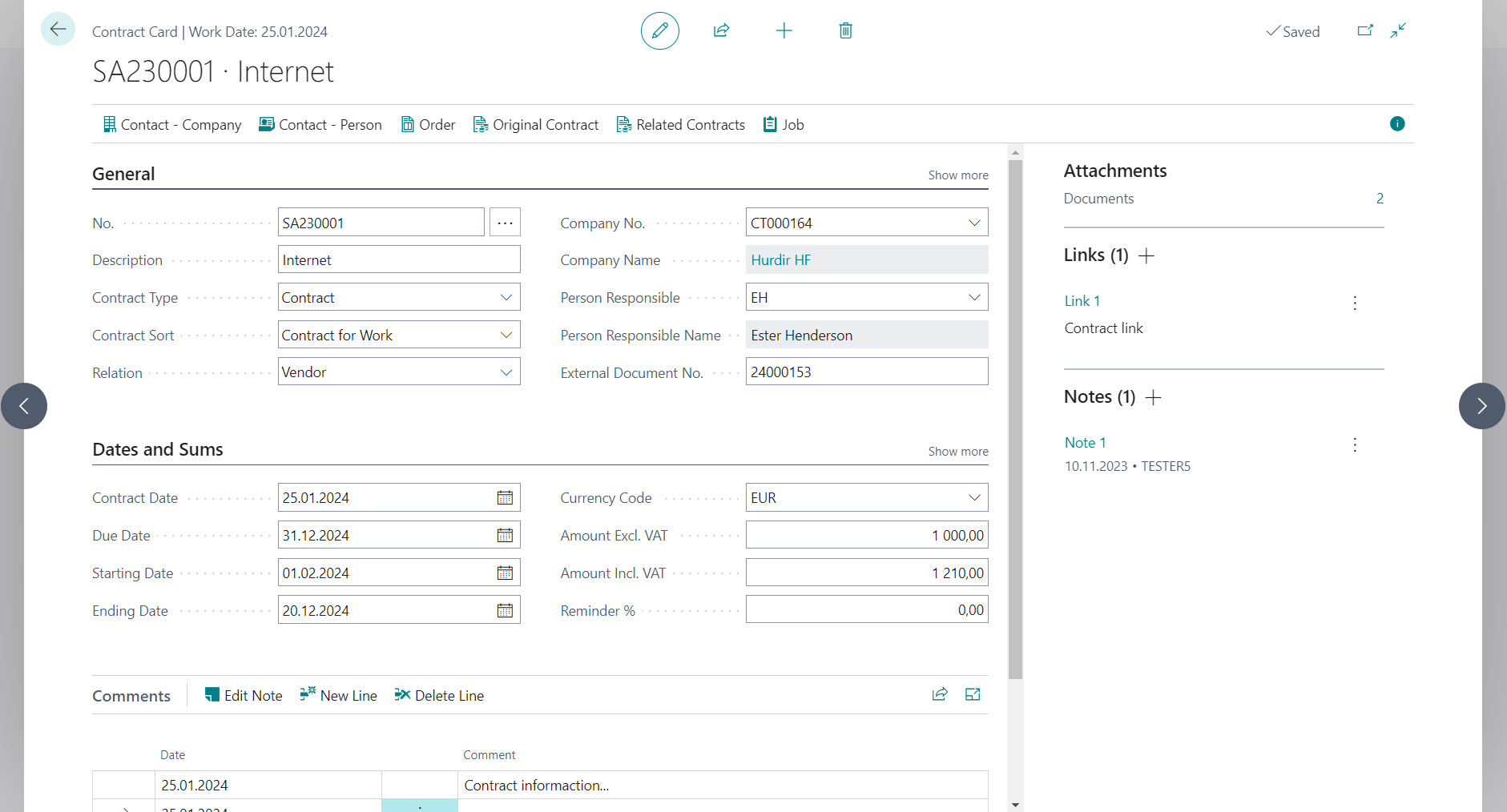
Card is divided into three sections:
General– includes basic information about the contractDates and Sums– allows you to record the validity dates of the contract as well as the currency and amounts of the contractComments– lines of notes
¶ General section
- No. – displays the assigned number according to the number series; it is the table's primary key. When creating a new contract, the user selects from one or more number series or enters the number manually if it is a manual number series.
- Number Series – the code of the selected number series is stored here; the field is not displayed on the card or in the overview
- Description – is used to enter the contract's description or "title". The maximum possible text length is 100 characters.
- Description 2 – is intended for entering any additional description; the field is displayed only when Show more is selected. The maximum possible text length is 100 characters.
- Contract Type – the value of the field determines the nature of the contract; the user chooses from preset values:
--Contract– this is a regular full-value contract, the default value.
--Addition– an addendum to an existing contract. In this context, using the field Original Contract No. is appropriate, which creates a link to the original document.
--Attachment– annexe to the existing contract. In this context, using the Original Contract No. field is advisable, which creates a link to the original document. - Contract Sort – one of the following options can be selected from the preset field values:
--Empty value– this is the default value
--Contract for Work
--Purchase Contract
--Mandate Contract
--Future Agreement Contract
--Association Contract
--Other sorts– expresses another contract sort not mentioned in the previous list - Relation – determines the relationship of the contract to the contact indicated on the contract from the point of view of the customer (purchaser) or supplier.
--Customer– default, contact is "our" customer
--Supplier– contact is "our" supplier
--Other relation– differently specified relationship to contact - Company No. – determines contact number – a company with which the given contract is resolved. With the selection of the company number, the Currency Code and Person Responsible are transferred to the Contract Card.
- Company Name – calculated from the contact based on the Company No.
- Contact No. – determines the contact number – a person with whom the given contract is settled; you can choose from the persons filtered by Company No. The field is displayed on the tab when selecting Show more.
- Contact Name – is calculated from the contact based on the Contact No. The field is displayed on the tab when selecting Show more.
- Person Responsible – allows you to enter the person responsible for the contract from the Sellers/Buyers overview; the value of the field is filled from the contact.
- Person Responsible Name – it is calculated based on the value of the Person Responsible field from the name of the relevant seller/buyer
- External Document No. – is used to enter the external document number of the customer or supplier
- Original Contract No. – specifies the original contract to which the current contract relates; this is an optional field.
- Closed – the field is used to mark the contract as concluded
- Order No. – allows you to set a simple link to sales or purchase orders according to the value in the field Relation:
--Relation = Customer– in the field, it is possible to select from theSales Order Overview
--Relation = Supplier– in the field, it is possible to select from thePurchase Order Overview
--Relation = other– the field can be manually edited without being linked to another overview - Project No. – enables you to enter a link to an existing project via the project overview
¶ Dates and Sums section
- Contract Date – expresses the primary data at the beginning of the contract. The field is also used to look up the exchange rate for conversions of amounts between LC and FC.
- Due Date – the value of the field determines the end of the contract
- Starting Date – expresses the starting date of the "action" to which the contract relates
- Ending Date – expresses the end date of the "action" to which the contract relates
- Currency Code – is used to enter a foreign currency, in which the values of the Amount Excl. VAT and Amount Incl. VAT fields are then displayed. It is reached out from the contact – the company.
- Amount Excl. VAT – determines the amount without VAT in the currency of the contract
- Amount Excl. VAT (LC) – determines the amount of the contract without VAT in local currency (LC)
- Amount Incl. VAT – determines the amount, including VAT, in the currency of the contract
- Amount Incl. VAT (LC) – determines the amount of the contract, including VAT in the local currency (LC)
- Reminder % – the field can be used to enter a penalty percentage optionally. The value has no further binding; it is only informative.
Contract amounts can be recorded in both local currency (LC) and foreign currency (FC). The Currency Code is added to the contract from Contact – Company; when changing, the question is displayed: "Do you want to update the currency of the contract with the currency of the currently inserted contact?".
If the contract is being worked on in a foreign currency, the system will offer the user a conversion from FC to LC based on the Currency Code and Contract Date and the last exchange rate found for it. The user can always edit the written amount manually. The system maintains the amount in foreign currency (FC) fields.
If the Currency code is changed on the current contract and the amounts are non-zero, the user is warned: "The fields of amounts in the local currency will be recalculated according to the currently found exchange rate." Please check afterwards.". Manually changing the date for the recalculation of amounts no longer has an effect.
If any amounts in a foreign currency are changed on the contract, the system warns the user: "The amount in the local currency will be changed based on the exchange rate found. Do you want to continue?". The same applies to the local currency: "The amount in foreign currency will be changed based on the exchange rate found. Do you want to continue?". The system does not display messages if the currency code is empty (i.e., the contract is in the local currency).
¶ Comments section
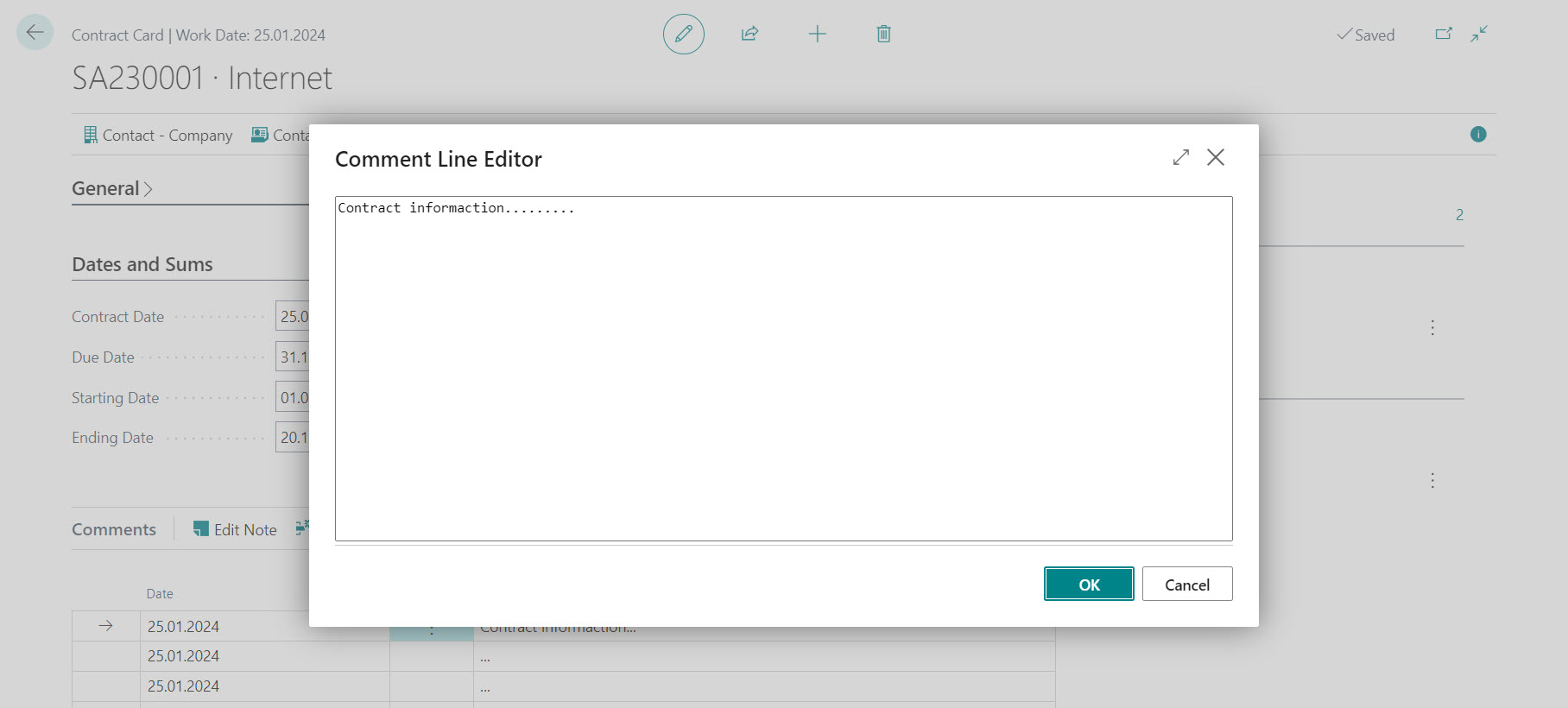
Line notes can be read, inserted and edited as part of the contract. To make working with them more convenient, you can use the Comment Line Editor, which allows you to write text in the usual way without adapting to the maximum length of the note line (a text of 80 characters). After closing the editor, the system automatically splits the text. The system accepts paragraph breaks.
¶ Ribbon
The following options are available in the Contract Card ribbon:
Contact – Company- displays the related contact – companyContact – Person- displays the related contact – personOrder- depending on the relationship, it displays a sales or purchase orderOriginal Contract- displays the contract document according to the value entered in the Original Contract No. fieldRelated Contracts- displays an overview of contracts filtered by Contract No. based on the Original Contract No.Job- displays Job Card
¶ Fact boxes
In the fact box, you can use the following:
AttachmentsLinksNotes
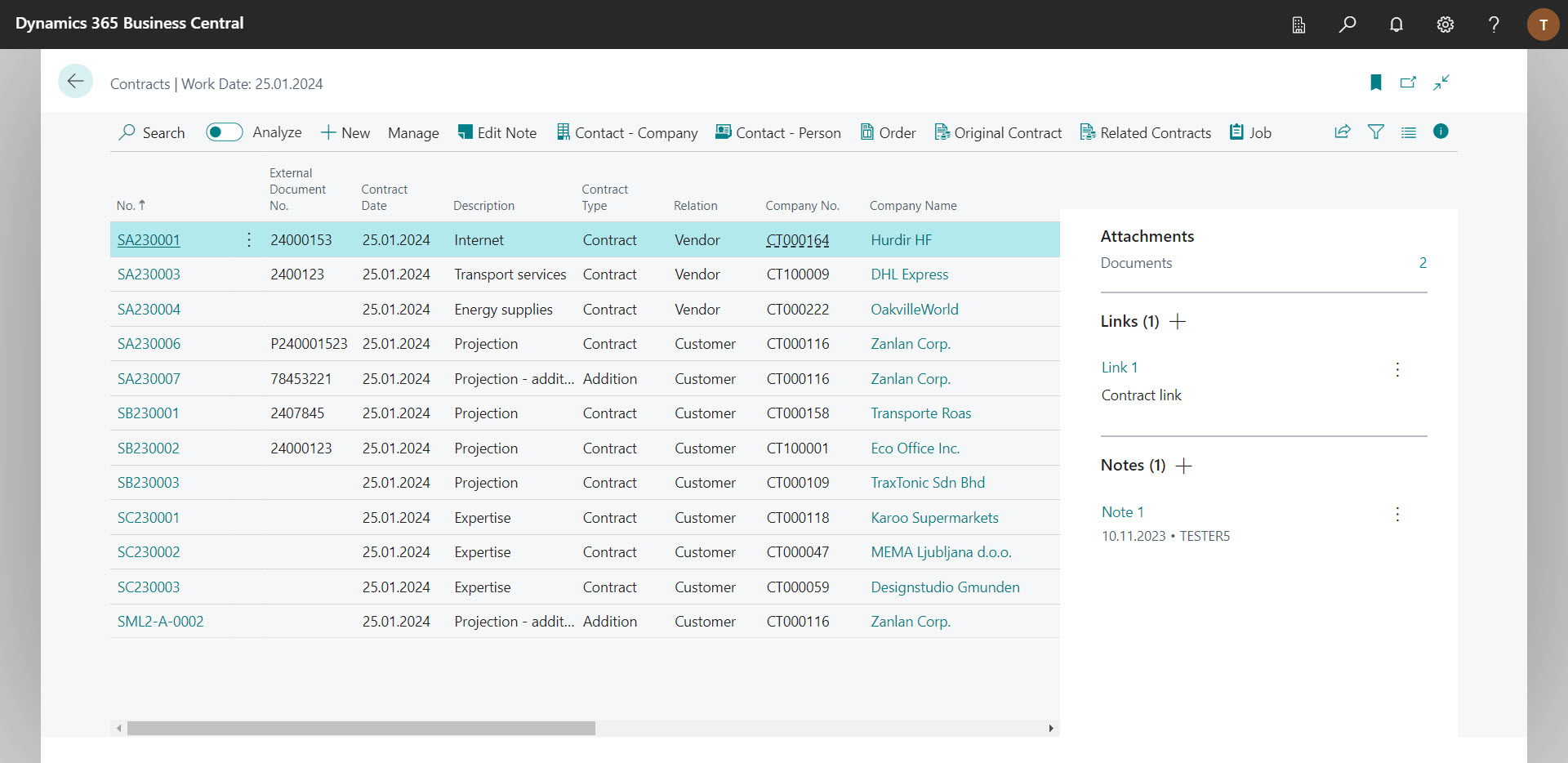
¶ Contract Overview
The contract overview ribbon is based on the card and includes the option to edit the contract note.
By default, the following fields are displayed in the columns:
- No.
- External Document No.
- Contract Date
- Description
- Contract Type
- Relation
- Company No.
- Company Name
- Contract Sort
- Currency Code
- Amount Excl. VAT
- Amount Incl. VAT
- Due Date
- Starting Date
- Ending Date
- Project No.
- Closed
- Contact No. - not displayed by default
- Contact Name - not displayed by default
- Amount Excl. VAT (LC) - not displayed by default
- Amount Incl. VAT (LC) - not displayed by default
- Description 2 - not displayed by default